
Profile Manager (w/ schedules) - Get APK
You'll be able to download in few seconds.
Publisher Description
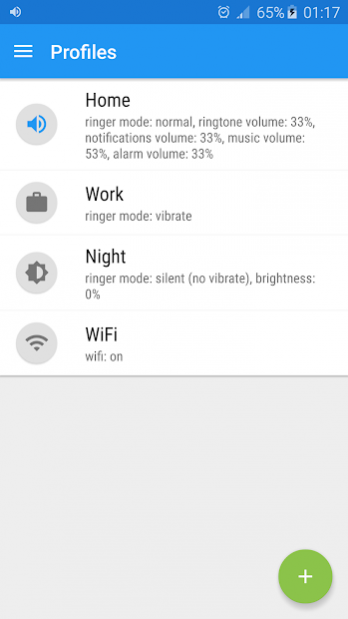
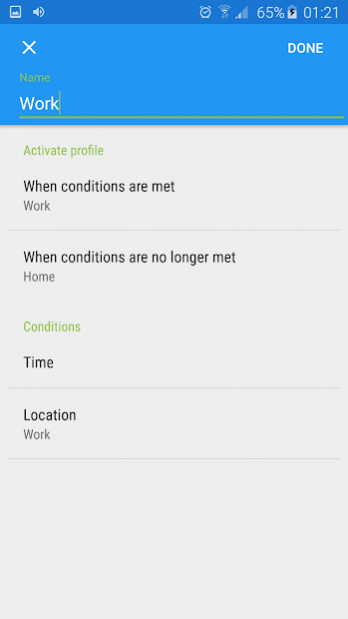
Profile Manager unlike many others is light, easy to use and battery friendly app for managing profiles. It lets you switch profiles right from notification drawer, lock screen, widget or app. You can customize each profile with volume, display, wireless, ringtone and other settings. Timed profiles allow you to activate a profile for desired duration e.g. when you are in a meeting you could activate silent profile for 1 hour. If this is not enough you can also create automatic rules and Profile Manager will automatically activate profile at your desired time or location or based on other conditions! What is also great is that you don't have to worry about switching to a new device and recreating all the settings because it is done automatically (Android 6.0 and higher)!
To activate a timed profile, simply swipe left and select desired duration
To rearrange profiles, long click on the profile and drag it to your desired position.
To delete a profile, simply swipe right from the profile list.
Each profile is customized by combination of these settings:
★ Ringtone & notifications volume
★ Music, video and games volume
★ Alarm volume
★ Voice volume
★ Phone ringtone
★ Default notification sound
★ Vibrate when ringing
★ Brightness
★ Screen timeout
★ Auto rotate
★ Wi-Fi
★ Mobile data
★ Bluetooth
★ Auto sync
★ Launch app
★ Disable lock screen
Issue Tracker: https://bitbucket.org/Ogix/profile-manager/issues?status=new&status=open
If you miss some features or something does not work on your device, please use issue tracker instead of writing bad review. I try to make quality apps but I cannot test on every device. Thank you for your understanding and good luck using this app!
About Profile Manager (w/ schedules)
The company that develops Profile Manager (w/ schedules) is Olegas Gončarovas. The latest version released by its developer is 1.0 .
To install Profile Manager (w/ schedules) on your Android device, just click the green Continue To App button above to start the installation process. The app is listed on our website since 2017-03-10 and was downloaded 0 times. We have already checked if the download link is safe, however for your own protection we recommend that you scan the downloaded app with your antivirus. Your antivirus may detect the Profile Manager (w/ schedules) as malware as malware if the download link to com.ogapps.notificationprofiles is broken.
How to install Profile Manager (w/ schedules) on your Android device:
- Click on the Continue To App button on our website. This will redirect you to Google Play.
- Once the Profile Manager (w/ schedules) is shown in the Google Play listing of your Android device, you can start its download and installation. Tap on the Install button located below the search bar and to the right of the app icon.
- A pop-up window with the permissions required by Profile Manager (w/ schedules) will be shown. Click on Accept to continue the process.
- Profile Manager (w/ schedules) will be downloaded onto your device, displaying a progress. Once the download completes, the installation will start and you'll get a notification after the installation is finished.
Program Details
System requirements
Download information
Pricing
Version History
version
posted on 2017-03-10
v2.6.0
Fixes for Android 7
Fixed performance issues
Local backup & restore
Better root detection
version
posted on 2016-10-03
v.2.5.2,Fix changing notification sound,v2.5.1,Prevent from crash in some cases,v2.5.0,Added Portuguese language (Thanks to David Junio!),Fixed setting volumes for Android 7 (requires DnD permission),Fixed reading external ringtone names (requires storage permission),Ability to disable profile "toggling" is the app settings,Small fixes for timed profiles
Disclaimer
External Download
We do not host Profile Manager (w/ schedules) on our servers. We did not scan it for viruses, adware, spyware or other type of malware. This app is hosted by Galad and passed their terms and conditions to be listed there. We recommend caution when installing it.
The APK Download link for Profile Manager (w/ schedules) is provided to you by apps112.com without any warranties, representations or guarantees of any kind, so access it at your own risk.
If you have questions regarding this particular app contact the publisher directly. For questions about the functionalities of apps112.com contact us.
